
If your child uses Snapchat, there’s one setting that I think every parent should know about: Snap Map.
I originally wrote this post years ago when Snap Map was first introduced and Miss Frugal was a Snapchat-loving teenager. A lot has changed since then – including the privacy settings themselves – so I thought it was about time I gave this post a proper update.
The good news is that Snapchat has made some important changes since I first wrote about it. Location sharing on Snap Map is now switched off by default and users choose who, if anyone, they want to share their location with.
Even so, I still think it’s worth understanding exactly what Snap Map does, particularly if you have a teenager using Snapchat.

What is Snap Map?
Snap Map is basically a map within Snapchat that lets you see the location of friends who have chosen to share their location with you.
Depending on someone’s settings, their location can be updated while they’re using Snapchat or they can choose to share their background location with selected friends and family so their location continues to update even when they’re not actively using the app.
That’s the part I’d want to understand if my child was using it.
When Snap Map was first introduced, I discovered it one morning when I was driving Miss Frugal and her brother to school. She was looking at the map and was able to tell me which friends we were about to pass, which were still at home and even that one of her friends was in a car a couple of cars ahead of us.
At the time I was in my usual morning rush to get them to school and myself to work, so I didn’t give it too much thought.
The more I thought about it during the day though, the less comfortable I became.
We’d spent years telling the kids never to share personal information such as their home address online, yet here was an app capable of showing someone’s location on a map.
That was when we sat down together and went through her settings.

Can everyone see your location on Snap Map?
No.
Snapchat says location sharing is now off by default and only friends you choose to share your location with can see where you are.
You can also choose between different levels of sharing, including sharing with selected friends or sharing with your friends except for particular people.
That makes the current version very different to the Snap Map I was worried about when I originally wrote this post.
But I would still encourage anyone with a teenager on Snapchat to sit down with them and actually look at who they’ve chosen to share their location with.
It’s very easy to accumulate Snapchat friends over the years and someone being on a friends list doesn’t necessarily mean they’re someone you’d be comfortable having access to your child’s location.
How to turn on Ghost Mode on Snapchat
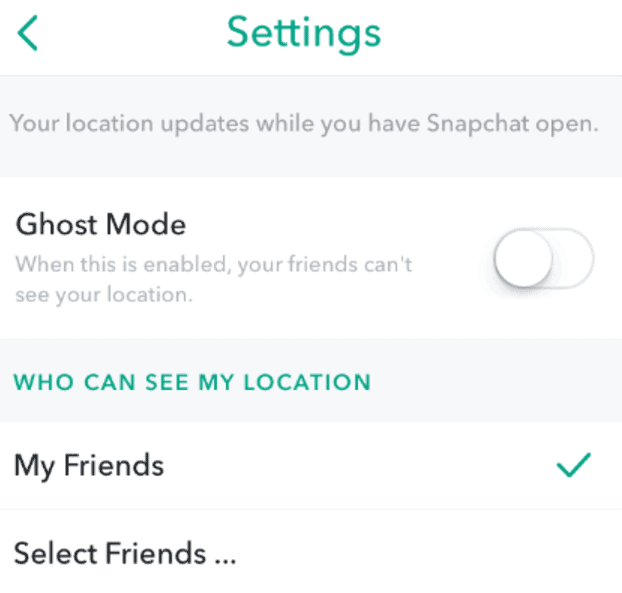
If you don’t want other Snapchat users to see your location on Snap Map, you can use Ghost Mode.
Open Snap Map and tap the settings cog at the top of the screen. From there, switch on Ghost Mode.
You can also get to the setting through your Snapchat settings. Go to My Privacy & Data, find the Who Can See section and choose See My Location. You can then switch Ghost Mode on.
When Ghost Mode is enabled, your location isn’t visible to other people on Snap Map.
It’s worth knowing that Ghost Mode doesn’t stop Snapchat itself accessing your location if you’ve given the app permission to do so on your phone. If you don’t want Snapchat accessing your location in the background, you’ll also need to check the app’s location permissions in your actual phone settings.
Check who your teenager is sharing their location with
If your teenager does want to use Snap Map, it doesn’t have to be all or nothing.
Snapchat allows users to choose specific friends who can see their location using Only These Friends, or share with friends while excluding particular people using My Friends, Except…
Personally, this is where I’d be having the conversation rather than simply saying they can’t use it.
Who genuinely needs to know where you are?
Would you be happy for every person on that list to know when you’re at home?
Do you actually know and trust everyone you’ve chosen?
They’re pretty simple questions, but they’re worth asking.
Snapchat Family Centre is worth knowing about too
This didn’t exist when I first wrote this post, but Snapchat now has a Family Centre specifically for parents and carers of teenagers aged 13–17.
It gives parents some oversight without letting them read their teenager’s private messages.
Parents can see who their teenager has been communicating with recently, see their friends and new friends, view some privacy settings and request that their teenager shares their location with them.
There are also location features that allow a teenager to share their live location with their parent and even notifications for when they arrive at or leave particular saved places.
I actually really like the principle behind that. There’s a big difference between having some oversight of who your child is talking to and reading every conversation they have.
Have a quick Snapchat privacy check together
The thing I’ve taken from looking back at this post years later is that the technology might have changed, but the conversation I’d have with my kids really hasn’t.
When Miss Frugal was younger, I trusted her completely but I still felt it was my job to understand the apps she was using and make sure the privacy settings were sensible.
I didn’t need to read every message she sent. I did want to know who she was talking to and make sure she understood what information she was sharing.
I’d do exactly the same now.
If your teenager uses Snapchat, spend five minutes together looking at Snap Map, check whether they’re sharing their location and, most importantly, check who they’re sharing it with.
You might find everything is already locked down exactly as you’d want it to be.
But it’s definitely worth five minutes to check. 😉
Don’t miss out on future posts like this – receive updates directly to your inbox by email by adding your email address here and hitting subscribe. You can also follow me on Twitter, BlogLovin or Networked Blogs and I’d love to see you over on my Facebook page and on Instagram.

Discover more from The Diary of a Frugal Family
Subscribe to get the latest posts sent to your email.








This is a very interesting and informative post. Thanks for sharing it.
Thank you for the sharing I have just changed this on my son's phone. But you must have a Home Internet Provider Service.
I use this app too! It's very useful for those people who take care about their health. I recomment to all of you, friends! And I also want to advise you this wonderful track cell phone Hoverwatch phone tracker It will collect information about the location of the phone.
sneaking is not a bad habit but as a parental responsibility we must be very careful about social media apps to our children. most of the time they are misuse of the social chatting apps. snap chat is one of them, there are common chances to misuse this apps by our children, we mus be very careful.
very good
success as a coach involves confidence, honesty, and forging mutual dedication with your players, Anthony Nicodemo is a champion. The head boys’ basketball coach at Saunders High School in Yonkers may not be overloaded with trophies, but he does have his team’s utmost respect, especially since coming out two years ago.
Parents should keep on follow their child to avoid them in doing wrong things, Good post.
Thank you for the heads up I have just changed this on my son's phone
Hello!
Thank you for sharing this article with me, I have a daughter, and I know how to experience it when it's not around. I installed a tracking tool on the bike on her bike, and put the program on my phone, the program is btw free. App you may find on this platform from the link below https://uboro.io. It's available even for your smasrt watch. Please be my guest. And thank you for advice.
instagram video downloader
Thank you for the heads up I have just changed this on my son’s phone
It's a seriously worrying thought that app developers can just include this without any prior warning. Many phones automatically update apps and new permissions are not always required.
Garreth uses snapchat and I trust him completely (although I have no idea how to manage the app myself). He'd already turned on Ghost mode himself. 🙂 (Very Proud Mummy here)